
Introduction
If you’re developing a Next.js app and looking for an easy way to handle your state, you’ve come to the right spot! The Redux Toolkit in Next.js is incredibly easy and straightforward. It assists you in structuring your data, handling updates, and keeping things running swiftly no more ugly code or frustration!
With Redux Toolkit in Next.js, you have tools that do most of the heavy lifting for you. It’s simple to set up, beginner-friendly, and just right for both small and large apps. No matter if you’re just getting going or expanding your project, it makes things easy and fun. Ready to get started? Let’s do it.
Learning Redux Toolkit in Next.js for State Management
Working with the state in a Next.js application can be cumbersome. However, the Redux Toolkit makes it easier and faster. It helps you keep track of your app’s data without stress.
What is Redux Toolkit in Next.js, and why should you use it?
Redux Toolkit in Next.js is a tool that makes working with Redux much simpler. Usually, setting up Redux takes a lot of steps and can be confusing. But Redux Toolkit provides you with a collection of simple tools to make the process easy. It makes it easy to create actions, reducers, and slices using less code.
You ought to use it because it saves time, minimizes errors, and makes your app perform better. Additionally, it’s wonderful in keeping your files clean and simple to read.
How Redux Toolkit makes state management easy in Next.js apps
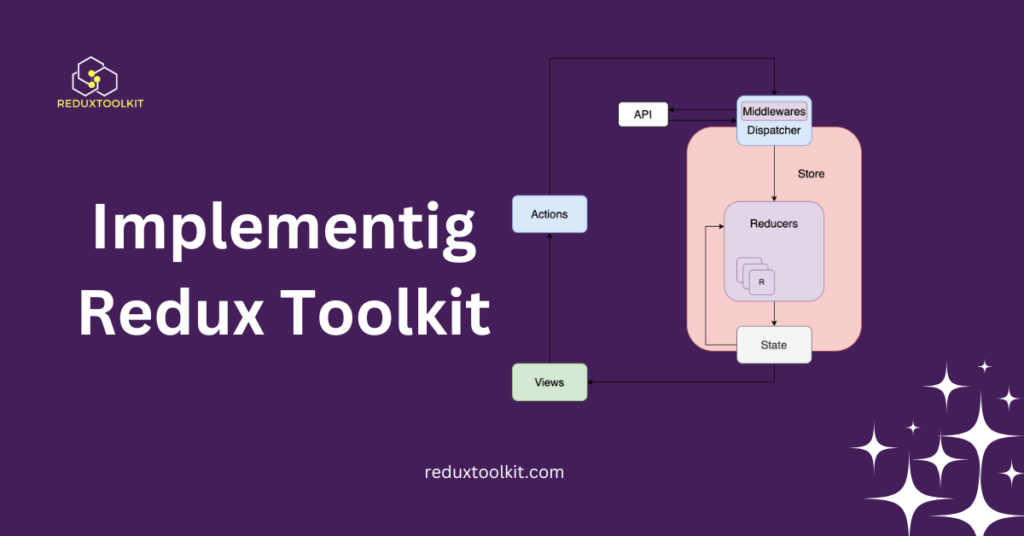
State management is maintaining account of things such as user info, settings, and more. Without help, this can get messy. Redux Toolkit in Next.js simplifies state management by giving you pre-built functions that handle everyday tasks.
You can update, add, or remove data without writing too much code. It also makes it easy to handle loading states and errors. This that your app functions effectively, and you have less bug-fixing time.
Setting Up Redux Toolkit in Next.js
Installing the Redux Toolkit in Next.js is simple and exciting. There are just a few steps to get all things running. Let’s keep it short and sweet.
How to install Redux Toolkit in Next.js step by step
First you need to install the correct packages. Open your terminal and execute this command:
npm install @reduxjs/toolkit react-redux
This will install both Redux Toolkit and React Redux. After that, you are ready to create your store and connect everything.
Next, create a folder called redux inside your project. This will help keep your files organized. You can add the files you need for the store and slices later inside the folder. Now, you have finished the installation part. That was easy, right?
How to configure the Redux store in Next.js using the Redux Toolkit
Now it’s time to set up your store. Inside the redux folder, create a file called store.js. In this file, you will set up the store using configure Store from Redux Toolkit. Here’s a simple example:
import { configureStore } from '@reduxjs/toolkit';
import yourSlice from './yourSlice';

export const store = configureStore({
  reducer: {
    yourData: yourSlice,
  },
});
Then, go to your _app.js file and wrap your app with Provider from react-redux. This will link your Redux store to your Next.js app. Your store is now ready to use.
Making Slices with Redux Toolkit in Next.js
Slices simplify the management of your app’s state. Using the Redux Toolkit in Next.js, you can simply create slices to manage various aspects of your data. Let’s explore how to do that step by step.
How to create a slice using Redux Toolkit in Next.js
A slice is like a small piece of your whole app state. It has its name, initial state, reducers, and actions. To create a slice, go to your redux folder and create a file, such as yourSlice.js. Then, use create Slice from the Redux Toolkit. Here’s a simple example:
import { createSlice } from '@reduxjs/toolkit';

const yourSlice = createSlice({
  name: 'yourData',
  initialState: { value: 0 },
  reducers: {
    increment: (state) => { state.value += 1; },
    decrement: (state) => { state.value -= 1; },
  },
});

export const { increment, decrement } = yourSlice.actions;
export default yourSlice.reducer;
This slice can now manage your counter data. You can add more actions or state as you need!
How to handle actions and reducers in Redux Toolkit for Next.js
Once you have your slice, you can utilize the actions in your React components. For instance, you can dispatch the increment or decrement action to alter the state. In your component, use the useDispatch() to invoke the actions and useSelector() to retrieve the current state.
import { useSelector, useDispatch } from 'react-redux';
import { increment, decrement } from '../redux/yourSlice';

const Counter = () => {
  const count = useSelector((state) => state.yourData.value);
  const dispatch = useDispatch();

  return (
    <div>
      <p>{count}</p>
      <button onClick={() => dispatch(increment())}>Increase</button>
      <button onClick={() => dispatch(decrement())}>Decrease</button>
    </div>
  );
};
Here’sHere’s how:
This is a straightforward example of using actions and reducers together. It helps your app work smoothly and keeps things organized.
Handling Async Logic with Redux Toolkit in Next.js
Working with async data in Redux Toolkit in Next.js is easy and fun! If your app needs to fetch data from an API, Redux Toolkit helps you do it without stress.
How to create and use async thunks in Redux Toolkit for Next.js
Async thunks are used to handle tasks like fetching data. You can make one with Redux Toolkit using createAsyncThunk. It runs async code and updates your state.
Here’sHere’s a simple example:
import { createAsyncThunk } from '@reduxjs/toolkit';

export const fetchUser = createAsyncThunk(
  'user/fetchUser',
  async (userId) => {
    const response = await fetch(`/api/user/${userId}`);
    return response.json();
  }
);
You can then add this thunk to your slice using extraReducers. It updates the state when the request is loading, successful, or fails. No extra code or tools are needed!
How do you manage loading and error states with Redux Toolkit in Next.js?
When you use async thunks, you often need to show a loading spinner or an error message.Redux Toolkit simplifies this. Within your slice, you can handle loading, success, and failure states within extraReducers.
For instance:
extraReducers: (builder) => {
  builder
    .addCase(fetchUser.pending, (state) => {
      state.loading = true;
    })
    .addCase(fetchUser.fulfilled, (state, action) => {
      state.loading = false;
      state.user = action.payload;
    })
    .addCase(fetchUser.rejected, (state) => {
      state.loading = false;
      state.error = 'Failed to load user';
    });
}
This enables your app to show messages such as “Loading.” or “Oops, something went wrong!” and updates users.
Best Practices for Implementing Redux Toolkit in Next.js
Applying the Redux Toolkit to Next.js can be seamless if you are aware of some intelligent tips. These best practices assist you in writing clean and manageable code.
How to structure Redux Toolkit files in big Next.js projects
When your Next.js project expands, there will be additional slices and files. It is necessary to stay organized. You can create a redux folder in your project. Inside, you can add subfolders like slices, store, and thanks. This makes it easy to find files later.
For example:
/redux
  /slices
    userSlice.js
    productSlice.js
  store.js
  thunks.js
This structure keeps everything neat, and it also helps your team work faster by eliminating the need to search for files.
Common mistakes to avoid when using Redux Toolkit in Next.js
Mistakes do occur sometimes! But you can prevent them. Don’t put all your logic in one big chunk—break things into smaller chunks. This will make your app faster and easier to manage. Also, never mutate the state directly. Always go back to a new state or use what Redux Toolkit offers. Finally, don’t forget to treat loading and error states when working with as ync data. This will make your app user-friendly and keep people happy.
FAQs about Redux Toolkit in Next.js
Here are some common questions people ask about the Redux Toolkit in Next.js. These simple answers will help you understand things better!
What is Redux Toolkit in Next.js, and how is it different from Redux?
Redux Toolkit in Next.js is a more straightforward way to use Redux. It reduces the code you write and makes state management easier.
How do I properly install the Redux Toolkit in Next.js?
You can install it by running this command: npm install @reduxjs/toolkit react-redux. It’s quick and easy!
Can I use the Redux Toolkit in Next.js with TypeScript?
Yes, you can! The Redux Toolkit works great with TypeScript. It provides type safety and helps catch errors early.
How do I manage complex states with Redux Toolkit in Next.js?
Break your state into small slices. This makes it easier to handle. Use createSlice and createAsyncThunk to manage actions and async calls.
Is the Redux Toolkit in Next.js suitable for small projects?
Yes! Even small apps can benefit from the Redux Toolkit. It keeps your code clean and simple from the start.
How does async thunk work in Redux Toolkit for Next.js apps?
createAsyncThunk helps you handle API calls. It manages loading, success, and error states for you.
Do I still need Redux DevTools when using Redux Toolkit in Next.js?
Yes! Redux DevTools helps you track state changes, which greatly simplify debugging, even with Redux Toolkit.
What are the top debugging tools for Redux Toolkit in Next.js?
You could utilize Redux DevTools and the browser console. They indicate to you the way that your state modifies with every action.
How does Redux Toolkit in Next.js differ from other state management libraries?
Redux Toolkit is strong and lightweight. It reduces boilerplate code and works excellently in Next.js apps. Some people also like using Zustand or Recoil for smaller apps.
Conclusion
Learning how to use the Redux Toolkit in Next.js makes managing the state much more manageable. It saves time by reducing extra code and makes your app faster and cleaner. Whether your project is big or small, Redux Toolkit helps keep things simple.
If you are new to state management or Redux, don’t worry! The Redux Toolkit provides easy-to-setup and easy-to-use tools. It also works well with TypeScript and async functions. Try it in your Next.js projects and see how smooth things become.
Latest Post: